
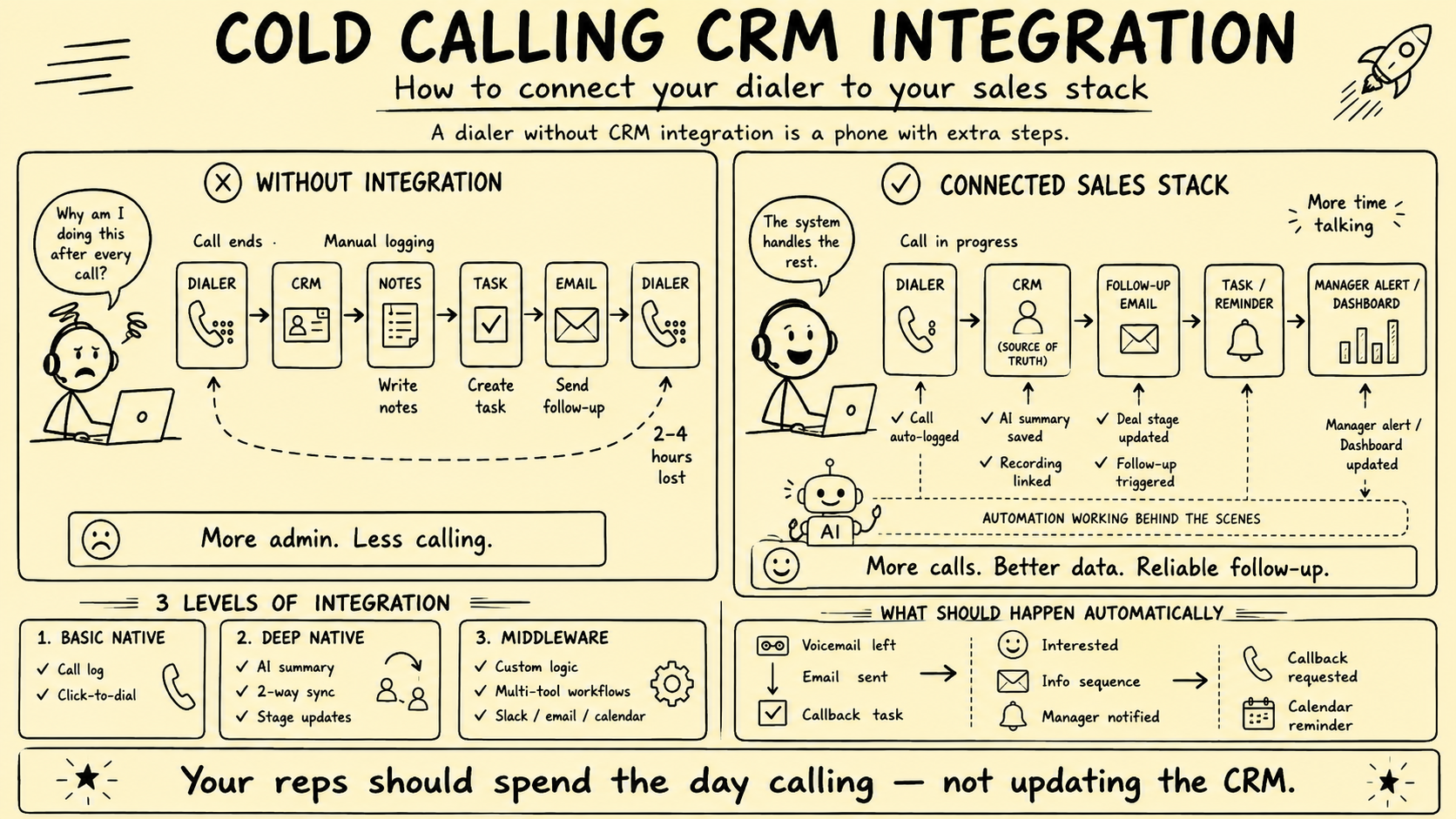
A CRM and dialer integration is not complete because a call appears in an activity feed. A reliable system must know which record was called, why the contact was eligible, who owned the relationship, what the recipient said, which system owns each fact, whether every write succeeded, and when all future contact must stop.
This article previously claimed manual logging consumed hours, named vendors as integration tiers, prescribed product-specific configurations, and treated automatic deal-stage changes, AI summaries, emails, proposals, and CRM updates as desirable defaults. Those claims and recipes were removed.
Direct answer: Define the brokerage data model and authority first. Assign field ownership, use stable identities and idempotent events, check suppression before queueing or dialing, route consequential changes for human approval, reconcile every system, and design recording, security, retention, and exit controls before production data moves.
This is an operating framework, not legal advice. Telemarketing, privacy, recording, professional, data-retention, and communications requirements vary by jurisdiction, call type, recipient, purpose, and data. Qualified legal, privacy, security, and professional owners should review the actual integration.
Model the broker relationships first
A flat contact record is not enough for brokerage work. One person can be an owner, buyer, adviser, referral source, investor, client, or party to several opportunities. The integration must preserve those relationships without exposing one matter to another.
At minimum, distinguish:
- Person and organization identity
- Seller, buyer, partner, and professional roles
- Relationship and engagement owner
- Prospecting eligibility by channel and jurisdiction
- Consent, approved basis, objections, and suppression
- Mandates, listings, buyer criteria, and opportunities
- Confidentiality and information-access state
- Call attempts, connections, outcomes, and agreed next steps
- Recordings, transcripts, AI drafts, and approvals
- Source provenance, timestamps, and audit events
Do not infer that every person attached to a company may receive every company-level note. Row, field, object, workspace, or matter-level access may be necessary for confidential deals.
Assign one authoritative owner per field
“The CRM is the source of truth” is too vague. Choose an authoritative system for each data element and define which systems may read, propose, or update it.
| Record or field | Possible authoritative owner | Integration rule |
|---|---|---|
| Person and organization identity | CRM or identity service | Merge only through reviewed identity rules |
| Number source and jurisdiction | CRM or data-governance store | Preserve provenance and evidence date |
| Consent or approved basis | Consent or compliance service | Append evidence; restrict overwrites |
| Suppression and objections | Central suppression service | Block before execution and propagate immediately |
| Relationship owner | CRM | Prevent campaign tools from reassigning silently |
| Raw call event | Dialer or event ledger | Immutable event with vendor and external IDs |
| Reviewed call outcome | CRM | Authorized user or approved low-risk rule |
| Recording | Controlled recording store | Link with scoped access; do not copy by default |
| Transcript and AI summary | Controlled content store or CRM draft | Attribute model, source, status, and reviewer |
| Deal stage or qualification | CRM | Human approval for consequential changes |
Two-way synchronization should not mean every system can overwrite every field. Bidirectional writes without authority rules create loops, stale reversions, and lost objections.
Design a durable identity strategy
Phone numbers are reusable, reformatted, shared, and sometimes wrong. Email addresses change. Names collide. Vendor contact IDs disappear during migration.
Use an internal immutable identifier for each person, organization, relationship, and opportunity. Store external-system IDs as mappings rather than primary identity. Normalize phone numbers while retaining the original value, source, validation state, and type.
Define how the integration handles:
- One person with several numbers or organizations
- Shared company or household numbers
- Duplicate imports and spelling variations
- Merged, split, archived, or deleted CRM records
- A number reassigned to a different person
- Seller and buyer roles held by the same person
- Multiple deals with different confidentiality permissions
Potential merges should enter a review queue when the evidence is uncertain. A false merge can expose confidential notes or apply another person’s consent or objection incorrectly.
Use an explicit event contract
Each integration event should carry enough information to process, audit, retry, and reconcile it safely.
Useful fields include:
- Unique event ID and event type
- Occurred-at and received-at timestamps
- Source system, tenant, user, and configuration version
- Internal and external record identifiers
- Previous and proposed values where relevant
- Call, campaign, number, and jurisdiction identifiers
- Eligibility and suppression decision reference
- Recording, transcript, or AI-processing flags
- Human actor or automation rule responsible
- Correlation ID linking one workflow across systems
- Schema version and integrity or signature data
Make consumers idempotent: processing the same event again should not create another call record, task, email, or deal. Store the event ID and result so retries are safe.
Do not assume events arrive in order. A call completion can reach the CRM before the call-start event; an objection can arrive while an earlier task creation is retrying. Use version checks, timestamps, state-transition rules, and compensating actions rather than blind last-write-wins updates.
Check suppression before execution
The FTC Telemarketing Sales Rule guide addresses written do-not-call procedures, entity-specific suppression, consent and authorization records, caller identity, abandonment, and how parties may allocate certain recordkeeping responsibilities. Its scope and exemptions require fact-specific review; it is not a complete global rulebook.
Operationally, suppression should be a synchronous precondition when a call is queued and again immediately before it is placed. Cached lists need defined freshness, invalidation, and fail-closed behavior.
When a recipient objects or asks not to be called:
- Capture the exact event, channel, scope, time, source call, and actor.
- Write it to the authoritative suppression service.
- Cancel pending calls, tasks, and related marketing actions.
- Propagate the state to every connected system and duplicate identity.
- Confirm completion or place failures in a visible exception queue.
- Retain the evidence required to prevent inappropriate future contact.
Test the path during webhook delay, API failure, user offline mode, campaign import, vendor replacement, number reformatting, and record merge.
Separate raw events, reviewed facts, and decisions
A call duration or connection timestamp is a raw event. “Interested seller,” “qualified buyer,” “agreed valuation input,” and “move to diligence” are interpretations or decisions.
Do not map one dialer disposition directly to a consequential CRM stage without defining:
- The evidence required
- Who is authorized to decide
- Whether the field is a draft or approved fact
- What happens when the caller corrects the disposition
- Which workflow may trigger after approval
- How the change can be reversed and audited
A safer pattern is: call event creates a proposed outcome and review task; an authorized person checks the notes or recording and approves the relationship or deal update. Low-risk operational events may be automated after testing, but material buyer, seller, valuation, confidentiality, and transaction states remain human-controlled.
Control recordings, transcripts, and AI summaries
Recording and transcription requirements vary across jurisdictions. A CRM integration should not enable or expose them globally because a connector supports the feature.
The ICO’s data-protection-by-design guidance emphasizes integrating appropriate technical and organizational measures from design through the processing lifecycle. Apply that principle to capture, transfer, access, use, retention, and deletion.
For each call type, document:
- Recording and transcription purpose
- Jurisdiction and approved notice or consent behavior
- Data categories and prohibited content
- Storage, region, encryption, and subprocessors
- Access roles, sharing, download, and audit logs
- Retention, legal hold, deletion, and backup handling
- Model provider, version, training-use settings, and prompts
- Whether outputs are drafts and who approves them
The NIST Generative AI Profile provides voluntary guidance for governing, mapping, measuring, and managing generative-AI risk. Use representative call tests to measure wrong speakers, missed negation, invented commitments, incorrect numbers or currencies, sensitive-data exposure, and unsupported summaries.
Store AI output as attributed, reviewable content—not an unattributed fact. Preserve the source call or passage, model and version, creation time, confidence or uncertainty where available, reviewer, corrections, and approval status.
Apply least privilege across the stack
The NIST Cybersecurity Framework 2.0 is voluntary cross-sector guidance organized around Govern, Identify, Protect, Detect, Respond, and Recover. It provides a useful structure for assessing the integration rather than assuming a native connector is secure by default.
Review:
- Separate service accounts instead of shared administrator credentials
- Minimum OAuth scopes and API permissions
- Role, team, matter, and field-level access where needed
- Multifactor authentication and strong administrator controls
- Secret storage, rotation, revocation, and environment separation
- Encryption in transit and at rest
- Audit logs for views, exports, writes, deletions, and configuration changes
- Vendor support access, subprocessors, data locations, and incident notice
- Rate limits, abuse controls, monitoring, backup, recovery, and exit
Do not send full contact, financial, or deal records when an integration needs only an identifier and outcome. Minimize payloads and redact unnecessary sensitive data.
Build failure handling and reconciliation
Retries without idempotency create duplicates. Silent failures create false confidence. A production integration needs both immediate error handling and scheduled reconciliation.
For every event, define:
- Success acknowledgment and timeout
- Retry policy with bounded backoff
- Non-retryable validation failures
- Dead-letter or exception queue
- Alert severity and accountable owner
- Manual replay or correction process
- Compensating action for partial completion
- Maximum acceptable synchronization lag
Run reconciliation that compares authoritative records with downstream copies. Examples include calls without CRM activities, CRM activities without source events, objections not present in suppression, pending tasks for suppressed contacts, orphaned recordings, stale owners, duplicate events, and AI drafts without review status.
Dashboards should report completeness and exceptions, not merely workflow executions.
Design post-call workflows with gates
An outcome can propose a next step, but the integration should check current state before acting.
| Proposed action | Checks before release |
|---|---|
| Create a follow-up task | Identity, owner, duplicate tasks, suppression scope, due date |
| Draft an email | Channel eligibility, source facts, recipient, confidentiality, approved template |
| Send requested information | Exact request, authorized materials, access level, human approval |
| Schedule a callback | Recipient-confirmed time, time zone, caller owner, current objection state |
| Update buyer criteria | Supporting statement, speaker identity, authorized reviewer |
| Change seller or deal stage | Evidence, professional owner, downstream effects, approval |
| Notify an internal team | Need-to-know audience and minimum necessary data |
Never include estimated deal value, financial data, personal details, or confidential opportunity information in broad chat notifications. Link authorized users to the controlled record instead.
Test the complete story
Use controlled contacts, numbers, users, and recordings before production launch.
Test:
- Correct, duplicate, shared, invalid, and reassigned numbers
- Click-to-call, no answer, voicemail, live answer, transfer, and disconnect
- Wrong party, objection, opt-out, complaint, and sensitive disclosure
- Recording enabled, disabled, paused, deleted, and access denied
- AI summary correct, uncertain, wrong, and unavailable
- CRM record merged, reassigned, archived, or edited concurrently
- Webhook delayed, duplicated, reordered, malformed, or missing
- API rate limit, credential revocation, vendor outage, and partial workflow failure
- Recovery, replay, reconciliation, export, and emergency shutdown
Define acceptance criteria for record accuracy, suppression propagation, duplicate rate, synchronization lag, material AI errors, unauthorized access, unresolved exceptions, and recovery time. Do not launch because the happy path worked once.
Plan migration and exit before launch
The brokerage should be able to export contacts, relationship mappings, source provenance, consent or basis evidence, suppression, raw call events, reviewed outcomes, tasks, recordings, transcripts, AI drafts, approvals, configuration, and audit history in usable formats.
Document number porting, connector shutdown order, webhook revocation, service-account removal, secret rotation, final reconciliation, vendor deletion, backup retention, and evidence preservation. Test a sample export and restore before signing a long-term commitment.
Measure reliability rather than automatic pipeline
Track:
- Eligible records queued and suppression blocks
- Call events received, processed, duplicated, delayed, and failed
- Cross-system state mismatches
- Objection-to-suppression propagation time
- Orphaned recordings and unauthorized-access attempts
- AI summary corrections and material errors
- Proposed versus approved outcomes
- Tasks created, completed, duplicated, or canceled
- Reconciliation exceptions and time to resolution
- Qualified conversations and accepted next steps
- Human review and follow-up workload
Do not claim that integration automatically creates pipeline or revenue. It can improve record continuity and workflow control; actual outcomes also depend on audience, relationships, caller judgment, service quality, market conditions, and other factors.
The practical conclusion
The goal is not a CRM that changes itself after every call. It is a controlled operating record that remains accurate when events repeat, arrive late, conflict, or fail.
Own the data model. Assign authority field by field. Enforce suppression before execution. Separate raw events from reviewed facts. Treat AI as draft material. Reconcile continuously. Give the brokerage a tested recovery and exit path.
To strengthen the connected workflow, review broker automation and AI systems or request a Business Broker Pipeline & Operations Assessment.
Frequently Asked Questions
Should the CRM be the source of truth for every call field?
Not automatically. The brokerage should assign one authoritative owner for each field or record type. The CRM may own relationship state while the dialer owns raw call events and a controlled store owns recordings. Define synchronization and retention explicitly.
Should a call disposition automatically change a deal stage?
Usually not for material buyer, seller, mandate, or transaction states. A disposition can create a proposed update or review task, but an authorized person should confirm the supporting evidence before a consequential pipeline change.
How should do-not-call requests synchronize?
Write the objection to a central suppression service immediately, acknowledge the event, block future queue creation, and propagate it to every relevant tool. Test duplicates, delayed webhooks, offline systems, imports, retries, and replacement vendors.
Can AI call summaries be written directly to the CRM?
Use them as attributed drafts until testing supports a narrower rule. Preserve the source call, model and version, timestamp, reviewer, corrections, and approval. Never let a summary silently establish consent, qualification, valuation inputs, or commitments.
What makes a CRM and dialer integration production-ready?
Documented field ownership, stable identifiers, idempotent events, ordered updates, suppression-first checks, least-privilege access, failure queues, reconciliation, monitoring, tested recovery, useful exports, and accountable human owners.
Sources and evidence notes
Primary or first-party materials reviewed for this article. Scope and limitations are stated rather than silently generalized.
- Complying with the Telemarketing Sales RuleU.S. Federal Trade Commission · Accessed
Official U.S. guidance addressing telemarketing scope, do-not-call procedures, consent and authorization records, caller identity, abandonment, and allocation of recordkeeping responsibility.
- Data protection by design and by defaultUK Information Commissioner’s Office · Accessed
Current UK guidance on integrating appropriate technical and organizational data-protection measures at design time and throughout the processing lifecycle.
- Cybersecurity Framework 2.0U.S. National Institute of Standards and Technology · Published · Accessed
Voluntary cross-sector framework for governing, identifying, protecting, detecting, responding to, and recovering from cybersecurity risk.
- Artificial Intelligence Risk Management Framework: Generative Artificial Intelligence ProfileU.S. National Institute of Standards and Technology · Published · Accessed
Voluntary cross-sector guidance for governing, mapping, measuring, and managing generative-AI risks across the AI lifecycle.
Brokerage data stays governed. Material deal decisions stay human.
We design business broker systems around least-privilege access, documented data flows, protected credentials, traceable activity, and approval gates. Systemify does not use client information to train its own models. When a workflow uses an external AI provider, its purpose, data fields, and retention approach are documented and approved before client data is transferred.
Apply this to your brokerage
We can assess your buyer and seller pipeline, valuation and vetting workflows, communications, documents, controls, and handoffs before recommending what to build.
Talk to a Broker Systems Expert